
Embroidery Digitizing
10 Common Embroidery Digitizing Mistakes and How to Avoid Them
By Tajima Digitizer Team · October 5, 2026
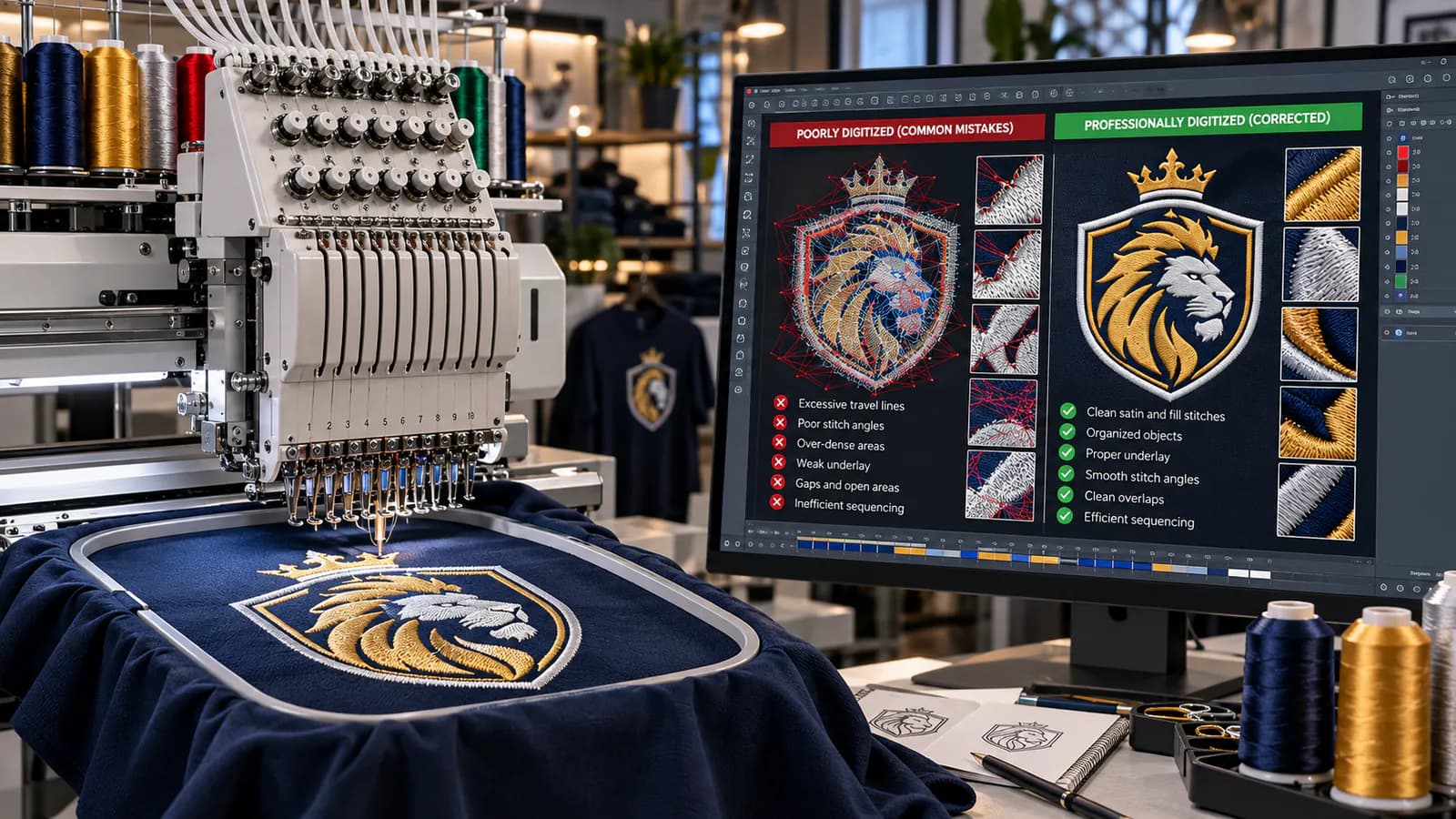
10 Common Embroidery Digitizing Mistakes and How to Avoid Them
A design can look perfect on a monitor and still sew badly on an embroidery machine.
That is one of the first lessons every serious embroidery shop learns.
A digital preview does not have fabric stretch. It does not experience thread tension. It cannot show exactly how thousands of needle penetrations will affect a polo, cap, fleece jacket, towel, or patch.
The embroidery file has to account for all of that before the machine starts.
That is why good embroidery digitizing involves much more than tracing artwork and selecting a stitch type.
A production-ready file has to balance:
Stitch type
Density
Underlay
Pull compensation
Stitch direction
Sequence
Travel paths
Finished size
Fabric behavior
Machine requirements
Get those decisions right and a logo can sew smoothly for hundreds of garments.
Get them wrong and you may see puckering, gaps, unreadable text, thread breaks, excessive trims, poor registration, or a design that simply does not resemble the original artwork.
This guide covers 10 common embroidery digitizing mistakes, explains why they happen, and shows how to avoid them before they become expensive production problems.
For shops that prefer to outsource this work, Tajima Digitizer's professional embroidery digitizing service builds machine-ready files by hand for the requested garment, size, and machine format. Tajima Digitizer
Quick Guide: The Most Common Embroidery Digitizing Errors
Mistake | What It Can Cause | Better Approach |
|---|---|---|
Starting without production details | Wrong density, size, sequence | Know garment, size and placement first |
Trusting auto-digitizing blindly | Poor object choices and inefficient stitches | Inspect and rebuild where necessary |
Choosing the wrong stitch type | Snags, poor coverage, bulky details | Match stitch type to object geometry |
Incorrect stitch density | Gaps, stiffness, puckering | Adjust density to fabric and stitch type |
Poor underlay | Sinking, weak edges, distortion | Build the correct foundation |
Ignoring pull compensation | Gaps and narrow columns | Compensate for physical thread pull |
Poor stitch direction | Flat appearance and distortion | Use angles intentionally |
Bad sequencing | Jumps, trims and registration problems | Plan the sewing order |
Keeping details too small | Unreadable text and muddy logos | Simplify for the finished size |
Skipping the sew-out | Production surprises | Test before bulk production |
These problems are connected. Fixing one setting while ignoring the others rarely produces the best result.
1. Digitizing Before You Know the Final Size and Garment
One of the most expensive embroidery digitizing mistakes happens before the first stitch is even created.
The digitizer starts working without knowing:
Finished width or height
Garment type
Placement
Fabric
Machine format
Whether the design is flat, cap, patch, or 3D puff
Those details directly affect how the file should be built.
Why Finished Size Matters
Embroidery does not scale like vector artwork.
Imagine the same company logo used in two places:
Left chest: 3.5 inches wide
Jacket back: 11 inches wide
You should not simply digitize one version and scale it to the other.
At 3.5 inches, fine details may need to be simplified and narrow areas may use satin stitches.
At 11 inches, those same areas may require different stitch types, densities, underlay, and sequencing.
Tajima Digitizer's logo guidance specifically notes that different sizes should be prepared properly rather than simply scaling one embroidery file. Tajima Digitizer
Why the Garment Matters
A stable workwear fabric behaves differently from:
Piqué polo
Stretch knit
Fleece
Towel
Structured cap
Beanie
Jacket
Patch twill
The artwork may be identical, but the embroidery strategy should not be.
How to Avoid This Mistake
Before digitizing, establish:
Final embroidery size
Garment or fabric
Placement
Machine/file format
Special technique
Thread or color requirements
Tajima Digitizer's own ordering process requests garment type, placement, finished size, and required format before the file is built. Tajima Digitizer
That is a good pre-production habit for any embroidery shop.
2. Treating Auto-Digitizing as a Finished File
Auto-digitizing can save time.
It can identify artwork shapes, generate stitches, and produce an embroidery file remarkably quickly.
But generated stitches are not automatically production-ready stitches.
Software cannot always make the same contextual decisions an experienced digitizer would make.
For example, it may not adequately judge:
Whether tiny text should be simplified
Where a satin column becomes too wide
Which object should stitch first
How a cap seam will affect registration
Whether an area needs additional compensation
Where travel can be hidden
Whether the resulting stitch count is unnecessarily high
An auto-digitized design can look convincing on screen while still containing inefficient or unsuitable embroidery construction.
How to Avoid This Mistake
Treat auto-digitizing as a starting point, not an automatic final answer.
Inspect:
Object boundaries
Stitch types
Stitch angles
Density
Underlay
Entry and exit points
Sequence
Jumps
Trims
If the design needs extensive corrections, rebuilding the problem objects may be faster and cleaner than repairing every automatically generated stitch.
For customer logos, caps, patches, puff designs, and repeated production work, manual decision-making usually becomes much more valuable.
3. Choosing the Wrong Stitch Type
Running, satin, and fill stitches are not interchangeable.
Each has a job.
A common digitizing mistake is choosing a stitch type because it looks right in software rather than because it is appropriate for the physical width and shape of the embroidered object.
Running Stitch
Running stitches are useful for:
Fine outlines
Small details
Travel
Decorative lines
Lightweight elements
Trying to turn a substantial filled area into a dense collection of running stitches usually makes little sense.
Satin Stitch
Satin produces smooth, polished columns and is ideal for:
Lettering
Borders
Narrow shapes
Monograms
Many logo elements
But satin has practical width limits.
As a satin column becomes very wide, the stitches become longer and more vulnerable to snagging or loosening.
At that point, a fill stitch may be more appropriate.
Fill Stitch
Fill or tatami-style stitching works well for:
Large solid areas
Wide shapes
Background panels
Jacket-back artwork
Large patch sections
But fill is not automatically the right choice for narrow lettering or small borders.
It can make them look coarse and unnecessarily dense.
How to Avoid This Mistake
Ask:
What stitch structure will reproduce this shape most cleanly at its actual finished size?
Do not choose solely from the appearance of the original vector shape.
Think in thread.
4. Using the Wrong Stitch Density
Density is one of the most misunderstood embroidery settings.
Beginners often assume:
more stitches = better coverage.
It does not work that way.
Too little density and the fabric shows through.
Too much density and the design can become stiff, distorted, and difficult to sew.
Signs of Too Much Density
You may see:
Thread breaks
Needle breaks
Puckering
Excessive stiffness
Bulky embroidery
Slow machine runs
Distorted fabric
Thread piling
If several dense objects overlap, the problem becomes even worse.
The machine may effectively be trying to push the needle through multiple complete layers of embroidery.
Signs of Too Little Density
You may see:
Fabric showing between stitches
Weak color coverage
Uneven surfaces
Poor edges
An unfinished appearance
Density Is Not a Fixed Number for Every Job
The correct density depends on:
Thread weight
Stitch type
Fabric
Underlay
Object size
Overlap
Desired visual effect
A heavy fleece design may need a different approach from the same logo on stable twill.
How to Avoid This Mistake
Evaluate density together with the underlay and material.
If a satin object looks weak, do not immediately increase top-stitch density.
The actual problem may be inadequate underlay.
Professional digitizing is about balancing these variables instead of pushing one setting to compensate for another.
Tajima Digitizer's custom service specifically builds files around stitch direction, density, underlay, and sewing order rather than treating the artwork as a simple file conversion. Tajima Digitizer
5. Using Too Much, Too Little, or the Wrong Underlay
Underlay is hidden beneath the finished embroidery, but it has a major effect on what the customer sees.
It can help:
Stabilize the material
Support the top stitches
Control edges
Reduce sinking
Improve satin loft
Limit distortion
The mistake is assuming one underlay setting works everywhere.
It does not.
Too Little Underlay
Insufficient foundation can produce:
Soft edges
Sinking stitches
Poor coverage
Unstable satin
Fabric movement
Too Much Underlay
Excessive foundation can create:
Bulk
Stiffness
Long run times
Thread buildup
Distorted small lettering
Match the Underlay to the Object
A narrow satin letter may need only a light center run.
A medium satin column might benefit from edge support.
A wide satin element may require a zigzag-style foundation combined with edge support.
A large fill object needs a different internal structure altogether.
How to Avoid This Mistake
Do not ask:
Which underlay setting should I use for this whole logo?
Ask:
What does each individual embroidery object need?
That object-by-object approach produces much cleaner files.
6. Ignoring Pull Compensation and Object Overlap
Embroidery is physical.
Thread tension pulls on the fabric as stitches form.
That means the shape you draw in software is not always the exact shape that appears after sewing.
Satin columns can become narrower.
Adjacent objects can pull away from one another.
Borders can reveal tiny gaps.
This is why embroidery digitizers use pull compensation.
What Pull Compensation Does
Pull compensation intentionally adjusts an object's width or boundary so that after the physical sewing process pulls the material, the finished embroidery lands closer to the desired dimensions.
It is not an error in the artwork.
It is compensation for an expected physical effect.
Overlap Matters Too
Imagine a blue fill ending exactly where a white satin border begins.
On screen, they touch perfectly.
During sewing, the fill pulls slightly.
Now a thin line of garment fabric appears between the fill and border.
A small controlled overlap can help prevent that gap.
How to Avoid This Mistake
When objects touch, consider:
Stitch direction
Fabric stretch
Density
Border width
Pull direction
Appropriate overlap
Do not simply place digital boundaries edge-to-edge and assume thread will behave like pixels.
For cap work, compensation becomes even more important because the design is sewing across a curved surface. Tajima Digitizer's dedicated cap and hat digitizing service specifically accounts for crown curvature, underlay, and center-out/bottom-up sequencing. Tajima Digitizer
7. Ignoring Stitch Direction
Stitch direction is not merely decorative.
It changes:
How thread reflects light
How a shape appears
How neighboring elements separate visually
How forces act on the fabric
How the embroidery feels and moves
Two areas using the same thread color can appear subtly different simply because the stitches run at different angles.
That can add depth without adding another color.
The Common Mistake
An inexperienced digitizer may allow every object to use nearly the same angle.
The finished design can look flat and mechanical.
Worse, poorly chosen directions can increase distortion.
Example
Imagine a three-petal logo.
If every petal stitches vertically, they may visually blend together.
If each petal follows its own natural direction, the thread reflection helps separate the shapes and gives the logo dimension.
How to Avoid This Mistake
Use stitch angles intentionally.
Consider:
Shape
Visual flow
Adjacent objects
Fabric movement
Natural structure of the artwork
A professional file should not simply fill shapes.
It should use stitch direction to help build them.
8. Poor Sequencing, Too Many Jumps, and Unnecessary Trims
A design can have excellent individual objects and still be poorly digitized if the stitch sequence is inefficient.
The machine follows the order stored in the file.
It does not know there was a shorter route.
Poor Sequencing Can Cause
Excessive jump stitches
Too many trims
Longer production time
Extra operator cleanup
Registration problems
Unnecessary color changes
More fabric movement
The effect becomes especially important during bulk production.
A Small Inefficiency Multiplies
Suppose poor sequencing adds only 15 seconds to a logo.
For one garment, that barely matters.
For 500 garments:
15 seconds × 500 = 7,500 seconds
That is more than two additional machine hours caused by a small sequencing problem.
And that does not include extra cleanup.
How to Avoid This Mistake
Plan:
Where the design starts
Which object follows which
Where travel can be hidden
Which same-color objects can be grouped
Where a trim is actually necessary
How objects can help stabilize one another
Do not chase the absolute minimum stitch count at the expense of quality.
The goal is an efficient production path that still sews correctly.
Tajima Digitizer's logo service specifically emphasizes optimized stitch counts for logos that may be reused across large uniform or production runs. Tajima Digitizer
9. Trying to Preserve Every Tiny Detail
Graphic artwork is not embroidery.
This becomes especially obvious with small logos.
A designer may provide:
1-point lines
Tiny registered symbols
Very small tagline text
Narrow gaps
Fine gradients
Hairline borders
Those details may look perfect on a high-resolution monitor.
Thread has physical thickness.
A needle has physical size.
Fabric moves.
At some point, a detail simply cannot be reproduced at the requested embroidery dimensions.
Small Text Is a Common Problem
Trying to keep every letter exactly as drawn can create:
Closed counters
Filled-in letters
Broken shapes
Unreadable words
Excessive density
Tajima Digitizer currently uses roughly 0.25 inches / about 6 mm as a practical minimum for many fonts on polo embroidery, while noting that spacing and letter shapes may need adjustment below that range. Tajima Digitizer
That is a useful guideline—not an absolute law.
Some fonts can work smaller.
Others fail even when larger.
Simplifying Does Not Mean Ruining the Logo
Good digitizing preserves the visual identity, not every pixel.
That may involve:
Opening small counters
Increasing spacing
Thickening fine strokes
Removing invisible details
Simplifying outlines
Combining very small shapes
How to Avoid This Mistake
Always inspect artwork at the actual embroidery size.
If a detail cannot sew cleanly, address it before production.
For corporate logos and small left-chest work, Tajima Digitizer's logo embroidery digitizing service focuses specifically on readable lettering, efficient stitch counts, and production use. Tajima Digitizer
10. Skipping the Sew-Out and Final Production Check
A screen preview is valuable.
It is not the final test.
Embroidery involves variables that software cannot perfectly reproduce:
Real thread
Real tension
Actual needles
Backing
Fabric stretch
Hoop pressure
Machine speed
Garment construction
A design that looks perfect in simulation can still reveal an unexpected problem during sewing.
What to Check During a Test Sew-Out
Inspect:
Registration
Do borders align with fills?
Do adjacent colors meet cleanly?
Lettering
Are counters still open?
Are letters readable at normal viewing distance?
Fabric
Is the garment lying flat?
Is there puckering?
Coverage
Is fabric showing where it should not?
Underlay
Does the design feel supported without becoming stiff?
Machine Behavior
Were there:
Thread breaks?
Excessive trims?
Long jumps?
Needle problems?
Unnecessary stops?
Finished Appearance
Does it still resemble the customer's original design?
How to Avoid This Mistake
For important or high-volume work:
test once before producing hundreds.
One sample garment is cheaper than correcting an entire order.
Tajima Digitizer's current workflow includes a rendered stitch-out preview before final file delivery, followed by requested machine formats and a revision process if adjustments are needed. Tajima Digitizer
Bonus Mistake: Using a Flat Embroidery File for 3D Puff
This problem deserves special mention because it is common and expensive.
3D puff is not simply flat embroidery stitched over foam.
The file itself needs to be constructed for foam.
Puff work may require:
Wider satin columns
Appropriate density
Closed ends
Stitching that perforates the foam
Controlled sequence
Enough coverage to hide the foam
Tajima Digitizer's puff service rebuilds designs specifically for foam rather than simply converting a standard flat file. Tajima Digitizer
If you are producing raised cap embroidery, use a file built through a proper 3D puff digitizing workflow.
Bonus Mistake: Treating Cap Embroidery Like Flat Embroidery
Caps create another special case.
A cap front is:
Curved
Often structured
Sewn in a rotating cap frame
Frequently divided by a center seam
That changes how the design should be sequenced.
A file that runs beautifully on a flat polo may gap, flag, distort, or sew crooked on a cap.
For cap embroidery, consider:
Center-out sequencing
Bottom-to-top construction
Crown curve
Center seam
Cap structure
Appropriate underlay
Compensation
Tajima Digitizer builds its cap files specifically around those conditions rather than treating caps as flat garments. Tajima Digitizer
How These Embroidery Digitizing Mistakes Affect Production
A poorly prepared file costs more than the price of digitizing.
Consider what happens in an embroidery business when a file is unreliable.
The operator may have to:
Stop the machine
Re-thread
Remove damaged garments
Adjust tension
Trim unnecessary jumps
Restart the design
Contact the digitizer
Re-run the order
Now multiply that across a multi-head machine.
A small problem in one file can become eight, twelve, or fifteen simultaneous problems.
That is why embroidery digitizing should be treated as production engineering, not just artwork conversion.
A Practical Embroidery Digitizing Preflight Checklist
Before exporting the final machine file, run through this checklist.
Artwork
Is the artwork clean enough to interpret?
Are tiny details suitable for embroidery?
Have unnecessary elements been simplified?
Production Specifications
Is the final size confirmed?
Is the garment known?
Is placement confirmed?
Is the machine format correct?
Stitch Construction
Are the stitch types appropriate?
Are satin columns within sensible widths?
Are fill areas constructed efficiently?
Density and Underlay
Is the top density appropriate?
Is underlay matched to each object?
Are overlapping sections becoming too dense?
Compensation
Are satin columns compensated?
Do touching objects have sufficient overlap?
Have likely gaps been anticipated?
Stitch Direction
Do angles follow the shapes naturally?
Do neighboring objects have enough visual separation?
Sequencing
Are color changes logical?
Are jumps minimized?
Are trims intentional?
Can travel stitches be hidden?
Small Details
Is text readable?
Are counters open?
Have thin lines been adapted?
Final Check
Does the design fit the intended hoop?
Is the file in the required format?
Has the design been previewed or test-sewn?
That final five-minute review can save hours later.
What Information Should You Give Your Digitizer?
Good production information leads to better files.
When ordering embroidery digitizing, provide:
Clean Artwork
Useful source formats include:
PNG
JPG
PDF
AI
SVG
Tajima Digitizer currently accepts those formats through its normal ordering process. Tajima Digitizer
Exact Finished Size
Give a width or height.
For example:
3.5 inches wide
is far more useful than:
normal left-chest size
Garment Type
Specify whether the design is for:
Polo
Shirt
Hoodie
Jacket
Cap
Beanie
Towel
Patch
Bag
Placement
Examples:
Left chest
Cap front
Sleeve
Jacket back
Center chest
Machine Format
Common formats supported by Tajima Digitizer include DST, PES, EXP, JEF, VP3, HUS, PCS, and XXX. Tajima Digitizer
If you are unsure, provide the embroidery machine manufacturer and model.
Common Questions About Embroidery Digitizing Mistakes
What is the most common embroidery digitizing mistake?
There is no single mistake responsible for every bad sew-out, but using the wrong settings for the final size and fabric is one of the most damaging.
Density, underlay, compensation, and stitch types need to suit the actual production environment.
Why does my embroidery pucker?
Possible causes include:
Excessive density
Poor stabilizer
Inadequate hooping
Incorrect underlay
Poor sequencing
Excessive thread tension
Fabric stretch
Puckering is rarely solved by changing one setting blindly.
Look at the whole production setup.
Why are there gaps between embroidery colors?
Common causes include:
Pull distortion
Insufficient overlap
Poor compensation
Fabric movement
Incorrect sequencing
Objects that touch perfectly on screen may still separate physically during stitching.
Why does my small embroidery text look filled in?
The text may be too small for its original font construction.
Other possible causes include excessive density, too much underlay, insufficient spacing, or satin columns that are too narrow.
Small embroidery lettering often needs to be redrawn rather than reproduced literally.
Does increasing density improve embroidery quality?
Not automatically.
Too much density can make a design stiff and create thread breaks, puckering, or excessive machine stress.
Better underlay or more appropriate stitch construction may solve the problem without increasing top-stitch density.
Should every embroidery object have underlay?
No.
Very small or narrow objects may require minimal or no underlay.
Large fills and wider satin areas usually need more substantial support.
Choose underlay according to the object rather than applying one global setting.
Why are there so many jump stitches in my embroidery file?
Excessive jumps usually point to inefficient sequencing, poorly chosen entry/exit points, or an automatically generated object order that has not been optimized.
Review how the machine travels from one element to the next.
Can I resize an embroidery file after it has been digitized?
Minor resizing may be possible, but major changes can alter density, stitch lengths, detail, and overall sewability.
A logo digitized for a small left-chest application should generally be rebuilt or properly adjusted for a large jacket back rather than simply stretched.
Why does my cap design sew differently from my shirt design?
Caps are curved and commonly use structured crown material and specialized frames.
That changes how fabric moves and how the design should be sequenced and compensated.
A flat-garment file should not automatically be assumed suitable for a cap.
How do I know whether a digitized file is good?
Look beyond the screen preview.
A good production file should:
Sew smoothly
Maintain registration
Produce readable text
Avoid unnecessary jumps
Use efficient color changes
Lay flat on the fabric
Preserve the artwork's identity
Run consistently across repeat garments
The sew-out is the real test.
Professional Digitizing Is About Preventing Problems Before the Machine Starts
The best embroidery files do not draw attention to themselves.
They simply work.
The operator loads the garment, starts the machine, and the design runs without constant intervention.
That reliability usually comes from dozens of small decisions made during digitizing:
Choosing satin instead of fill
Reducing density in an overlap
Moving an entry point
Adding the correct underlay
Increasing a letter opening
Changing a stitch angle
Adding compensation
Reordering two objects
Removing an unnecessary trim
None of those changes may look dramatic on a computer screen.
Together, they can make the difference between a troublesome file and a production-ready one.
Final Thoughts
Most embroidery digitizing mistakes come from treating thread like digital artwork.
Thread has thickness.
Fabric moves.
Tension pulls.
Needles penetrate.
Machines follow instructions literally.
Good embroidery digitizing accounts for all of those realities.
The ten biggest mistakes to watch for are:
Starting without the final size and garment
Trusting auto-digitizing without inspection
Choosing the wrong stitch type
Using incorrect density
Using poor underlay
Ignoring pull compensation and overlap
Neglecting stitch direction
Creating inefficient sequences
Keeping details too small
Skipping the final sew-out
Avoid those mistakes and your designs are far more likely to sew cleanly, run efficiently, and remain consistent through production.
If you would rather spend your time running embroidery machines instead of troubleshooting stitch files, Tajima Digitizer can convert your artwork into a professionally prepared, machine-ready design.
The service currently works with embroidery shops, uniform suppliers, apparel brands, and other businesses, providing hand-digitized files in major embroidery formats with stitch-out previews and revisions. Tajima Digitizer
Get professional embroidery digitizing from Tajima Digitizer