
Embroidery Digitizing
Professional Embroidery Digitizing vs Auto-Digitizing: Which Is Better?
By Tajima Digitizer Team · October 5, 2026
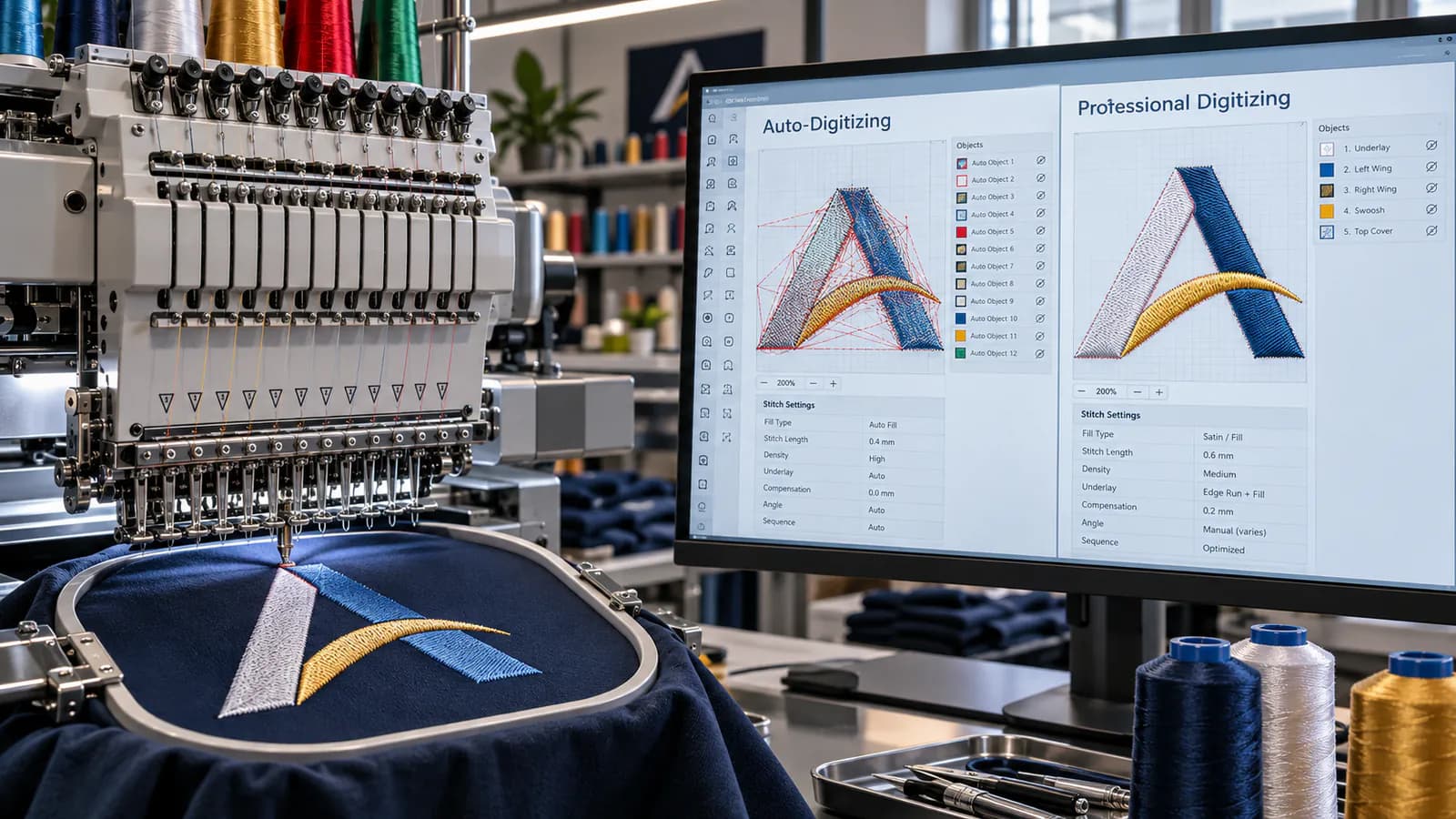
Professional Embroidery Digitizing vs Auto-Digitizing: Which Is Better?
Modern embroidery software can turn artwork into stitches surprisingly fast.
Import a logo, choose an auto-digitizing option, and within seconds you may have something that looks like an embroidery file.
So why pay a professional digitizer?
The answer becomes clear when the design moves from the computer screen to an actual embroidery machine.
Auto-digitizing interprets artwork according to software rules. Professional embroidery digitizing makes production decisions based on the artwork, finished size, garment, fabric, embroidery technique, and how the design needs to sew.
That distinction affects far more than appearance.
It can influence:
Stitch quality
Small lettering
Fabric distortion
Thread breaks
Stitch count
Machine run time
Registration
Trims and jumps
Cap performance
3D puff coverage
Overall production consistency
Auto-digitizing is not useless. Modern systems can produce workable starting points from clean, simple artwork, and software such as Wilcom and Hatch includes sophisticated automatic conversion tools. But even Wilcom's own technical guidance notes that automatically selected stitch directions may not always be optimal and that fabric-related settings such as underlay, density, and pull compensation should be checked before production. Wilcom International
For an embroidery shop trying to keep machines running efficiently, that difference matters.
This guide explains professional embroidery digitizing vs auto-digitizing, where each approach works, where automation struggles, and how to choose the right method for your next embroidery job.
What Is Professional Embroidery Digitizing?
Professional embroidery digitizing is the process of manually interpreting artwork and building an embroidery design specifically for thread, fabric, and machine production.
It is not simply tracing the shapes in a logo.
A digitizer decides how every important part of the design should sew.
That includes decisions such as:
Running stitch, satin stitch, or fill stitch
Stitch direction
Stitch density
Underlay
Pull compensation
Entry and exit points
Object sequence
Travel paths
Jumps
Trims
Color-change order
Overlaps
Small-detail simplification
At Tajima Digitizer, files are built by hand according to the garment and fabric information supplied with the order, with attention to density, underlay, compensation, and stitch sequence. Tajima Digitizer
That production-first approach is the basis of the site's professional embroidery digitizing service.
What Is Auto-Digitizing?
Auto-digitizing uses software to analyze artwork and automatically turn its shapes and colors into embroidery objects and stitches.
Depending on the program, the software may:
Analyze the image.
Reduce its colors.
Identify separate shapes.
Trace object boundaries.
Choose stitch types.
Assign stitch directions.
Generate a stitch sequence.
Export the result to a machine file.
Modern systems can do this impressively quickly.
Wilcom describes its automatic system as identifying and tracing objects, selecting stitches such as satin and tatami, assigning stitch directions, and reducing colors. Hatch similarly provides automatic conversion tools that detect shapes, colors, and stitch sequences and then allow the user to edit the resulting objects. Wilcom International
The important word is automatic.
The software is making decisions based mainly on the geometry and color information it can detect in the artwork.
It does not inherently understand your production situation the way an experienced operator does.
Professional Digitizing vs Auto-Digitizing at a Glance
Factor | Professional Digitizing | Auto-Digitizing |
|---|---|---|
Speed to first file | Slower | Very fast |
Human control | High | Limited until manually edited |
Simple artwork | Excellent | Can work well |
Complex logos | Strong | Often needs cleanup |
Small lettering | Carefully optimized | Can be inconsistent |
Fabric-specific settings | Set for the garment | Often based on defaults |
Cap sequencing | Can be planned specifically | May require major adjustment |
3D puff | Built specifically for foam | Not ideal as a one-click workflow |
Underlay | Chosen for object and material | Usually rule/default based |
Pull compensation | Adjusted to production needs | Often default based |
Stitch sequence | Planned intentionally | Automatically generated |
Stitch count | Can be optimized | Can be inefficient |
Production readiness | Designed for it | Must be checked |
Best use | Customer and production work | Simple designs, testing, drafts |
The takeaway is not that automation is bad.
It is that speed and production judgment are two different things.
The Biggest Difference: Artwork Logic vs Embroidery Logic
A graphic designer sees a logo as shapes, lines, colors, and typography.
An embroidery digitizer has to see something different.
The digitizer sees:
Which line is too thin to sew
Which text will close up
Which element should stitch first
Where two objects should overlap
Which column will pull inward
Where the fabric is likely to move
Whether a shape should be satin or fill
Where travel stitches can be hidden
Whether the design is suitable for a cap
Whether a detail should be simplified
Auto-digitizing begins primarily with what the artwork contains.
Professional digitizing begins with what the embroidery needs to do.
That difference is fundamental.
Example: A Corporate Left-Chest Logo
Imagine a company logo containing:
A circular icon
Small text
A thin underline
Two colors
The artwork looks simple.
An automatic tool might identify the icon, convert the text-like shapes, create the underline, choose stitch types, and produce a file.
Visually, the preview may look fine.
But an experienced digitizer may notice that:
The small lettering needs wider spacing.
The underline is too thin at the requested size.
Part of the circle will sew cleaner with satin rather than fill.
The fabric is a piqué polo, so additional support is required.
The objects need to overlap slightly to avoid gaps.
The stitching order can reduce unnecessary trims.
Those decisions are why a digitized preview and a good sew-out are not always the same thing.
For logos that will be reused across uniforms or production orders, Tajima Digitizer's logo embroidery digitizing service is built around readable small details, efficient stitch counts, and the requested finished size. Tajima Digitizer
Where Auto-Digitizing Works Well
Auto-digitizing deserves a fair comparison.
There are situations where it can be genuinely useful.
1. Clean, Simple Artwork
Automatic conversion performs best when artwork contains:
Clear boundaries
Solid colors
Simple geometry
Few colors
Minimal fine detail
Wilcom's documentation specifically says auto-digitizing quality depends heavily on the source artwork, with clean, well-defined images producing better results. Wilcom Docs
A simple two-color badge made from large geometric shapes is a much better candidate than a detailed crest containing gradients, tiny lettering, and decorative lines.
2. Quick Concepts and Previews
Auto-digitizing can be useful when you need to answer:
"Roughly what might this look like embroidered?"
It can also help with:
Early mockups
Approximate stitch counts
Internal design testing
Customer visualization
Wilcom itself identifies previews and stitch-count estimates as useful auto-digitizing applications. Wilcom International
That is different from saying the automatic output should always go straight to production.
3. Experienced Users Who Plan to Edit the Result
Auto-digitizing becomes far more valuable when it is treated as a starting point rather than a finished answer.
An experienced digitizer can let software create basic objects, then manually correct:
Stitch types
Underlay
Density
Angles
Sequence
Compensation
Entry and exit points
Hatch explicitly supports this hybrid workflow, allowing automatically generated objects to be reshaped, reordered, and edited after conversion. Hatch Embroidery
Used this way, automation can save time without surrendering control.
Where Auto-Digitizing Often Struggles
The more production decisions a design requires, the less reliable a one-click approach becomes.
Small Lettering
Small embroidery text is unforgiving.
A few tenths of a millimeter in spacing or column width can affect readability.
Automatic software sees shapes.
An experienced digitizer considers whether those shapes can still be reproduced cleanly in thread at the requested size.
Professional small lettering may require:
Increased spacing
Reduced detail
Modified letter shapes
Different underlay
Carefully controlled density
A different stitch strategy entirely
That kind of judgment is difficult to reduce to a universal automatic rule.
Complex Logos
Detailed logos may contain:
Tiny objects
Thin strokes
Gradients
Shadows
Overlaps
Outlines
Multiple layers
Trying to reproduce every graphic detail literally can create a poor embroidery design.
Professional digitizing often requires selective simplification.
The goal is not always to copy every pixel.
The goal is to preserve the identity of the artwork in thread.
Low-Quality JPGs and Images
Auto-digitizing is particularly dependent on clean input.
JPEG compression, anti-aliasing, blurred edges, image noise, and low resolution can make object detection harder. Wilcom recommends preparing bitmap artwork before automatic conversion because image noise and color variation can create unwanted objects. Wilcom Docs
A human digitizer can often interpret what a poor image was intended to represent instead of reproducing every imperfection.
Tajima Digitizer accepts common source formats including PNG, JPG, PDF, AI, and SVG, and the workflow allows artwork to be interpreted before the stitch file is manually built. Tajima Digitizer
Why Fabric Matters So Much
One of the largest weaknesses of generic automatic conversion is that embroidery does not happen on a neutral digital canvas.
It happens on fabric.
A design sewn on:
stable twill
does not behave the same as that design on:
stretch knit
and neither behaves the same as:
fleece, towel, cap material, or a performance polo.
Fabric influences decisions about:
Underlay
Density
Compensation
Stitch length
Sequencing
Stabilization
Wilcom's own auto-digitizing documentation notes that fabric-related settings such as underlay, density, and pull compensation use defaults and should be checked before production. Wilcom International
That is an important point.
The software can recognize a shape.
It does not automatically know everything about how your particular garment will react to thousands of needle penetrations and tensioned stitches.
Professional Digitizing vs Auto-Digitizing for Caps
Caps are one of the clearest examples of why production knowledge matters.
A cap front is not a normal flat embroidery surface.
It is curved and often structured, and the design runs in a cap frame.
Sequence matters.
Tajima Digitizer's cap workflow uses center-out and bottom-up sequencing, underlay suited to the cap style, and compensation for the crown. The site's guidance also notes that a design prepared for a flat shirt can shift or gap when simply reused on a curved cap. Tajima Digitizer
That is far beyond basic shape recognition.
For cap jobs, a properly prepared cap and hat embroidery file is usually a safer production choice than sending untouched auto-digitized artwork to the machine.
Professional Digitizing vs Auto-Digitizing for 3D Puff
3D puff creates another set of specialized requirements.
The design is stitched over foam, which means the digitizing needs to account for:
Foam thickness
Wider satin columns
Suitable density
Needle perforation
Capped ends
Foam containment
Stitch order
Tajima Digitizer specifically rebuilds puff designs for foam rather than simply converting flat embroidery files, because flat settings are not designed to cut and cover the foam correctly. Tajima Digitizer
That makes 3D puff a strong example of a job where generic automatic digitizing may create stitches but not necessarily a production-ready puff file.
For raised cap or apparel work, use a file built specifically for the technique through 3D puff embroidery digitizing.
Professional Digitizing vs Auto-Digitizing for Patches
Patch embroidery also has production-specific requirements.
A patch may need:
Full background coverage
Controlled fills
Clean text
Placement or cut lines
A satin border
A merrow-ready edge
Specific final dimensions
Tajima Digitizer's patch service builds files according to the chosen coverage and border method rather than treating a patch as a generic flat logo. Tajima Digitizer
That distinction becomes particularly important in production, where a poorly planned border or background can waste material and machine time.
For patch jobs, professional patch digitizing allows those production requirements to be planned from the beginning.
What Professional Digitizers Control That Automation May Miss
Stitch Type
Not every narrow shape should become satin.
Not every broad shape should automatically become fill.
A digitizer considers the final dimensions, visual effect, and durability before choosing.
Stitch Direction
Stitch angle affects more than appearance.
It can influence:
Light reflection
Texture
Shape
Fabric movement
Registration
Changing stitch direction between neighboring objects can also give a logo dimension without adding another color.
Underlay
Underlay creates the foundation beneath visible embroidery.
Different objects may need:
No underlay
Center run
Edge run
Zigzag
Fill-style underlay
Combinations
A default that works for one object can be wrong for another.
Pull Compensation
Thread tension pulls embroidery inward.
A digitizer can compensate by intentionally adjusting the geometry so the final sew-out appears correct.
Too little compensation can create gaps.
Too much can distort the design.
Sequencing
The order in which objects sew can affect:
Registration
Trims
Jumps
Machine time
Fabric movement
Appearance
A machine follows the instructions it receives.
It does not stop and ask whether sewing object 14 before object 9 would make more production sense.
Travel and Trims
Poorly planned travel can leave unnecessary jumps and trims throughout a design.
Those extra machine actions matter when the logo is repeated across:
12 shirts
100 uniforms
1,000 promotional garments
A few unnecessary seconds in one design can become meaningful production time across a large order.
Can Auto-Digitized Embroidery Still Look Good?
Absolutely.
A simple design produced from excellent artwork may sew perfectly acceptably after automatic conversion.
There is no reason to pretend otherwise.
The problem arises when "the software generated stitches" is treated as equivalent to "the design is production-ready."
Those are different standards.
A useful distinction is:
Auto-digitizing asks whether software can create embroidery from the artwork. Professional digitizing asks how the artwork should be embroidered for this specific job.
That is why the two approaches sometimes produce similar results on simple artwork but dramatically different results on difficult designs.
Is Manual Digitizing Always Better?
Not automatically.
Poor manual digitizing is still poor digitizing.
A person can make bad decisions just as software can.
The real advantage of professional digitizing is not that a mouse is being moved by a human.
It is that the file is being created by someone who understands how design decisions affect the actual sew-out.
Professional work should demonstrate judgment in:
Stitch construction
Fabric behavior
Machine efficiency
Detail simplification
Sequence
Underlay
Compensation
The quality comes from the decisions, not simply from the fact that the process is manual.
Why a Stitch Preview Is Not Enough
A polished screen rendering can be useful, but embroidery is a physical process.
The finished result is affected by:
Fabric
Backing
Hoop tension
Thread
Needle
Machine tension
Speed
Garment construction
A design can look attractive in simulation and still reveal problems when sewn.
That is why a strong workflow includes review and the ability to make corrections.
Tajima Digitizer's process includes a stitch-out preview before final file delivery and free revisions when adjustment is required. Tajima Digitizer
You can see the full workflow on the How It Works page.
When Auto-Digitizing Makes Sense
Auto-digitizing can be the practical choice when:
The artwork is extremely simple
You are experimenting rather than producing customer work
You need a rough prototype
You want an initial stitch-count estimate
You understand digitizing well enough to inspect and edit the result
The design will be test-sewn before real production
Think of it as a tool.
Used by an experienced operator, automation can speed up certain steps.
Used without inspection, it can simply produce mistakes faster.
When Professional Embroidery Digitizing Is Worth It
Professional digitizing becomes especially valuable when the design involves:
Customer logos
Corporate uniforms
Small lettering
Caps
Patches
3D puff
Appliqué
Large jacket backs
Complex artwork
Stretch or textured fabric
High-volume production
Brand-critical embroidery
In these situations, the cost of the digitizing file is usually small compared with the cost of:
Ruined garments
Machine downtime
Thread breaks
Operator intervention
Re-running an order
Missing a deadline
Delivering poor embroidery to a customer
A cheap or automatic file is not inexpensive if it creates expensive production problems.
Auto-Digitizing vs Professional Digitizing: A Real Production Example
Consider a shop preparing a left-chest company logo for 250 polos.
Auto-Digitized Version
The automatic file looks acceptable on screen.
But during production:
Small letters begin filling in.
Several objects leave unnecessary trims.
A border pulls away from the fill.
Dense sections make the polo pucker.
Operators have to clean up more thread between garments.
Now multiply those issues by 250 pieces.
Professionally Digitized Version
The digitizer knows the design will run at left-chest size on piqué polo fabric.
So the file is prepared with:
Readable lettering
Suitable satin widths
Correct underlay
Fabric-appropriate compensation
Cleaner sequencing
Efficient travel
Controlled stitch density
The difference is not merely how pretty the design looks in software.
It is how efficiently and consistently the entire order runs.
That is why production embroidery businesses often treat digitizing as part of manufacturing preparation, not just artwork conversion.
Should You Buy Digitizing Software or Outsource the Work?
That depends on how your business operates.
Learning Professional Digitizing Makes Sense If:
You digitize every day
You want complete in-house control
You have time to learn the craft
You regularly modify customer artwork
You are prepared to test and refine files
Professional embroidery software can be powerful, but buying software does not automatically create digitizing expertise.
There is a learning curve involving:
stitch construction, fabric behavior, compensation, sequencing, lettering, underlay, and production testing.
Outsourcing Makes Sense If:
Your priority is running embroidery machines
You only digitize occasionally
Customer turnaround matters
You do not want to maintain expensive software
You need specialized files such as puff or cap embroidery
You want a production-ready file without spending hours building it yourself
Tajima Digitizer is designed around this second workflow: embroidery shops, decorators, uniform suppliers, brands, and makers can upload artwork online and receive machine-ready formats without handling the digitizing in-house. The service supports major formats including DST, PES, EXP, JEF, VP3, HUS, PCS, and XXX. Tajima Digitizer
What to Look for in a Professional Embroidery Digitizing Service
Not every paid file is automatically a good file.
Before choosing a digitizing partner, look for a process that asks about:
Finished Size
Embroidery should be prepared for its actual dimensions.
A 3.5-inch chest logo should not simply be stretched into a 10-inch jacket-back design later.
Garment or Fabric
The digitizer should know whether the design is intended for a polo, cap, fleece jacket, towel, patch, or another application.
Required Machine Format
Your production system may need DST, PES, EXP, JEF, VP3, or another format.
Revisions
Real production can reveal issues that are not obvious on screen.
A revision process matters.
Turnaround
Production shops often cannot wait several days for every new customer logo.
Tajima Digitizer currently lists standard turnaround at 4–12 hours, with logo digitizing starting at $10, depending on the job. Tajima Digitizer
How Tajima Digitizer Handles Professional Digitizing
The workflow is straightforward:
1. Upload Your Artwork
PNG, JPG, PDF, AI, SVG, and other common source formats can be submitted with the garment, size, and machine-format information. Tajima Digitizer
2. The Design Is Reviewed
The artwork is evaluated for the intended embroidery application.
3. A Digitizer Builds the Stitch File
Stitch types, density, underlay, sequence, trims, and other production decisions are built into the design rather than relying on an untouched automatic conversion. Tajima Digitizer
4. Review the Preview
A stitch preview allows the design to be checked before final delivery.
5. Receive the Correct Machine Files
The finished design can be supplied in formats appropriate for common embroidery systems.
6. Request Adjustments When Needed
Free revisions are included according to the site's ordering policy. Tajima Digitizer
For current pricing and job types, see Tajima Digitizer's embroidery digitizing prices.
Frequently Asked Questions
Is professional embroidery digitizing better than auto-digitizing?
For production work, complex logos, small lettering, caps, puff embroidery, and fabric-sensitive jobs, professional digitizing usually provides greater control because the file can be built around the actual garment and production conditions.
Auto-digitizing can still work well for clean, simple artwork or as a starting point.
Is auto-digitizing bad?
No.
Auto-digitizing is a useful technology.
The problem is assuming every automatically generated file is ready to sew without inspection.
Professional software manufacturers themselves recommend checking and adjusting results, particularly fabric-related settings. Wilcom International
Can auto-digitizing create a DST file?
Yes.
Auto-digitizing systems can turn artwork into embroidery designs and export machine files such as DST. Wilcom International
The question is not whether the file extension is valid. The important question is whether the stitches inside it are suitable for production.
Can auto-digitizing handle logos?
Simple logos with clean edges and solid colors can be good candidates.
Logos containing tiny text, thin details, complex overlaps, gradients, or difficult geometry usually require more manual judgment and editing.
Why does auto-digitizing struggle with JPG files?
JPG images can contain compression artifacts, blurred edges, anti-aliasing, and color noise. Those artifacts make it harder for software to identify clean embroidery objects. Wilcom recommends image preparation and color reduction before automatic conversion. Wilcom Docs
Does professional digitizing reduce stitch count?
A skilled digitizer can often avoid unnecessary stitches, trims, and inefficient sequencing.
The lowest possible stitch count is not always the goal, however. The correct goal is an efficient file that maintains the required appearance and stability.
Is manual digitizing better for small text?
Small lettering often benefits strongly from manual decisions about column width, spacing, density, underlay, and simplification.
That is why business logos and uniforms are common candidates for professional logo digitizing.
Should 3D puff be auto-digitized?
Puff embroidery requires settings specifically designed for foam, including suitable columns, density, and edge closure. For reliable production, it is better treated as a specialized digitizing job than as an untouched one-click conversion. Tajima Digitizer
Can I auto-digitize first and then manually edit it?
Yes—and this is one of the best uses of automation.
Experienced digitizers can use an automatic result as a starting point and then manually correct the objects that need production-specific treatment. Hatch explicitly supports this kind of hybrid workflow. Hatch Embroidery
Final Verdict: Professional Digitizing or Auto-Digitizing?
There is a place for both.
Auto-digitizing wins on speed.
It can convert clean, uncomplicated artwork into stitches quickly and can be valuable for previews, rough estimates, experiments, and as a starting point for further editing.
Professional embroidery digitizing wins on control.
A skilled digitizer can account for the things an automatic conversion cannot fully understand from the artwork alone:
The exact finished size
The garment
The fabric
Small lettering
Stitch direction
Underlay
Pull compensation
Sequencing
Caps
Puff
Patches
Real production efficiency
For hobby experiments, automatic conversion may be enough.
For an embroidery shop putting a customer's logo on dozens or hundreds of garments, the standard should be higher:
The file should not merely contain stitches. It should be built to run.
That is the difference professional digitizing is meant to provide.
If you have a JPG, PNG, PDF, AI, SVG, logo, or customer artwork that needs to become a production-ready embroidery file, use Tajima Digitizer's professional embroidery digitizing service. Files are hand-digitized for the intended garment and supplied in major machine formats, with stitch previews and free revisions available. Tajima Digitizer