
Embroidery Digitizing
Types of Underlay in Embroidery: How to Choose the Right One
By Tajima Digitizer Team · October 5, 2026
Types of Underlay in Embroidery: How to Choose the Right One
By Tajima Digitizer Team · October 5, 2026
Your logo looks sharp in the stitch preview, but the sew-out tells a different story: small letters lose their edges, a wide satin border looks uneven, or stitches disappear into a polo’s texture. Before increasing density, check the foundation beneath the visible embroidery.
That foundation is underlay. The right choice helps support the design; a poorly matched choice can add bulk without solving the problem. A narrow letter stem, a broad satin border, and a filled background each need a different approach.
This guide explains six underlay constructions, how common software labels relate to them, and how to choose a starting setup you can verify on the actual fabric.
Quick answer: Start with center run for narrow satin, edge run for boundary support, zigzag for wider satin, and open tatami underlay for large fills. Double zigzag and double tatami offer additional support when needed. Evaluate each object by its width, fabric, and sew-out results.
What Is Underlay in Embroidery?
Underlay is a foundation of stitches sewn beneath an embroidery object’s visible satin or fill stitching. It helps anchor the area, support the cover stitches, and manage fabric movement as the design sews.
It can also help lettering stand above a soft or textured surface. However, underlay works alongside the physical materials used to stabilize the garment.
Component | Where it goes | What it does |
|---|---|---|
Underlay | Sewn into the design beneath the cover stitches | Supports individual embroidered objects |
Backing or stabilizer | Behind the fabric | Supports the fabric during stitching; some types remain afterward |
Topping | On the fabric’s surface | Helps keep stitches from sinking into texture or pile |
For example, a terry towel may need suitable backing, water-soluble topping, and digitized underlay. Each addresses a different part of the job. Ricoma’s stabilizer guide explains the role of backing and topping on textured fabrics.
The Six Underlay Types at a Glance
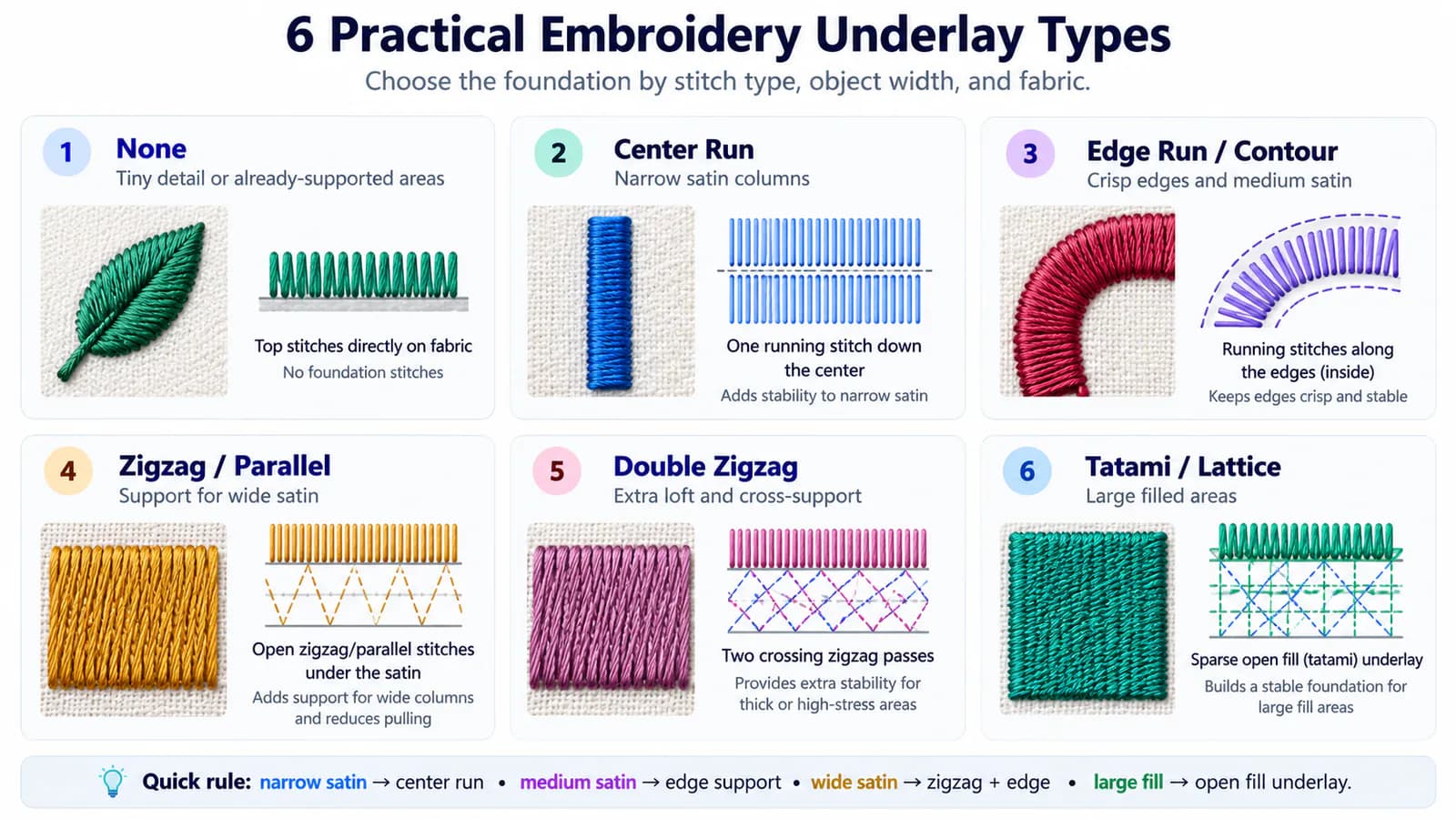
The list below separates light running-stitch foundations from broader satin and fill foundations. It includes single and double versions of zigzag and tatami; software packages may group these differently.
Underlay construction | Starting application | Main purpose |
|---|---|---|
Center run | Narrow satin strokes and small lettering | Light support along the center |
Edge run | Satin edges and object boundaries | Support near the perimeter |
Zigzag | Wider satin columns | Support across the column’s interior |
Double zigzag | Wide satin that needs additional support or loft | Two intersecting zigzag passes |
Tatami / fill | Large filled shapes | Open support across an area |
Double tatami | Filled shapes needing additional support | Two angled fill passes |
You may also encounter center walk, edge walk, contour, parallel, perpendicular, or lattice. Check the generated stitch path before treating these as equivalent settings. In Ink/Stitch, for instance, contour underlay runs along the two sides of a satin column; it serves a similar edge-support role to an edge run. A perpendicular fill foundation describes its angle relative to the cover stitching.
The stitch path matters more than the label.
1. Center Run Underlay
Center run places running stitches along the middle of a satin column. It provides a light foundation where a larger underlay structure would be difficult to fit.
Use it for: narrow lettering strokes, fine satin borders, and thin logo elements.
Wilcom’s run-stitch guidance gives columns around 2–3 mm wide as an example of a center-run application. Measure the width of the individual stroke, rather than judging only by the letter’s overall height.
Consider a small letter “A”: its narrow stems may suit center run, even though the complete letter is much wider. Its open center also needs enough space to remain readable after stitching.
Watch for: using a center line as the only foundation under a broad satin shape. The middle may be supported while the edges still need attention.
2. Edge Run Underlay
Edge run follows the inside boundary of an object. Under a satin column, it provides support close to the sides where the visible stitches end.
Use it for: lettering, satin borders, curved columns, and filled shapes that also need perimeter support.
The inset matters. Underlay placed too close to the finished outline may remain visible; moving it too far inward reduces support near the boundary. Wilcom defines the underlay margin as the distance between the object outline and the underlay’s edge.
Depending on the software, an edge-following option may be called contour or edge walk. Ink/Stitch’s contour underlay documentation is a useful example of this naming difference.
Watch for: assuming an edge run stabilizes an entire large area. A wide column or broad fill may also need an internal foundation.
3. Zigzag Underlay
Zigzag underlay crosses back and forth beneath a satin column. Its open structure supports more of the interior than a single running-stitch path.
Use it for: wider satin lettering, broad borders, and other substantial satin elements.
Where a wide border needs both interior and boundary support, consider zigzag together with edge run. Wilcom’s zigzag settings guide describes combining these foundations beneath satin cover stitching.
Watch for: making the zigzag so dense that it becomes another heavy layer. If the sew-out is stiff or crowded, review the total stitches beneath the cover, including overlaps with nearby objects.
4. Double Zigzag Underlay
Double zigzag uses forward and return passes at opposing slants to create an intersecting foundation. Compared with a single zigzag, it can provide additional support and loft.
Use it for: wide satin elements where the sample shows that a lighter foundation is insufficient.
Wilcom documents this structure in the same zigzag settings guide. Additional loft is one possible benefit, but it also adds stitches. Treat it as an adjustment to test, rather than the default for every bold letter.
Watch for: adding it beneath narrow strokes or enabling it simply because the option is available.
5. Tatami or Fill Underlay
Tatami underlay creates open rows of running stitches across a filled shape. It supports an area rather than only its center or perimeter.
Use it for: filled logo backgrounds and other broad fill objects.
Coordinate its direction with the top fill. “Perpendicular” describes one possible orientation; it is not a universal name for every fill foundation. An edge run may accompany the area underlay.
Watch for: copying the dense top fill underneath it. The foundation should remain open.
6. Double Tatami Underlay
Double tatami uses two open fill passes at different angles to create an intersecting foundation.
Use it for: filled shapes on very soft or elastic fabric when additional support is needed. Wilcom’s tatami underlay guidance covers both single and double tatami, including combinations with edge run.
Watch for: using two passes automatically. If one open foundation gives an acceptable sew-out, the extra stitches may offer little benefit.
When Should You Use No Underlay?
“None” is a valid setting choice, although it does not create an underlay structure. Extremely small details may have little room for a separate foundation. Some elements stitched over an existing embroidered area may also need less additional support.
Test these choices carefully. A tiny satin detail on firm fabric and the same detail on fleece can behave very differently.
Small text deserves particular attention. Check the width of each stroke and the open spaces inside letters such as “a,” “e,” and “o.” Wilcom’s lettering guidance includes omitting underlay for very small lettering and using a single running-stitch foundation for larger narrow strokes. Treat those recommendations as starting points for the font, thread, and fabric you are using.
If the text remains unreadable, review the letter size or simplify the artwork. Another underlay layer cannot create space that the design does not have.
How to Choose Underlay for Your Fabric
Object geometry narrows the options; fabric helps determine how much support is needed. Wilcom’s underlay overview notes that larger objects and stretchy fabrics generally require more foundation than smaller objects on firm materials.
Fabric or application | Main concern | What to test |
|---|---|---|
Twill or denim | Edge definition and coverage | A light foundation appropriate to the object |
Piqué polo | Texture and fabric movement | Suitable backing, object-specific underlay, and topping if needed |
T-shirt or stretch knit | Stretch and distortion | Appropriate cut-away support and restrained stitch buildup |
Fleece or terry towel | Stitches sinking into the surface | Suitable backing and topping alongside the underlay |
Caps also require attention to construction, mounting, and sewing sequence. A flat-garment file should be reviewed before being reused on a curved cap. Ricoma’s digitizing guidance discusses why the intended garment affects the file.
Four Settings to Check Before Adding More Underlay
Selecting a stitch structure is only part of the decision. Review these settings when the foundation is not doing its job:
Margin or inset. Keep the underlay covered while retaining useful support near the edges.
Spacing. Check how open the zigzag or fill foundation is. In settings expressed as distance between rows, a larger distance produces a more open structure.
Running-stitch length. Inspect tight curves and corners. Long straight segments may cut across a curve instead of following it closely.
Direction. Review the angle of the underlay relative to the cover stitches, especially in filled objects.
Also separate underlay from pull compensation. Underlay supplies a foundation; compensation adjusts stitch placement to account for the shape changing during sewing. If a satin column finishes too narrow, increasing its foundation may not address the width issue. Ink/Stitch’s satin documentation explains this distinction.
When you adjust density, read the setting’s units. A smaller spacing value usually means more closely packed stitches. That can make an attempted reduction in density do the opposite of what you intended.
Worked Example: One Logo, Three Underlay Decisions
Imagine a left-chest logo for a piqué polo with three elements: narrow company-name lettering, a broad satin emblem, and a filled background. This is an illustrative starting plan, not a tested production recipe.
Logo element | Starting choice | What the sample should reveal |
|---|---|---|
Lettering with roughly 2 mm satin strokes | Center run | Whether the strokes stay clear and the letter openings remain open |
Broad satin emblem | Zigzag plus edge run | Whether the interior and edges have adequate support |
Filled background | Open tatami, with edge run if needed | Whether coverage and the boundary remain consistent |
Use backing appropriate to the knit and consider topping if the texture interferes with the surface stitching. Then sew the complete logo at its intended size.
Look closely at overlaps. The lettering may sit over an already stitched background, so its actual foundation differs from lettering placed directly on bare fabric. Review the combined layers before adding support.
If the emblem’s interior looks satisfactory but its edge is uneven, inspect the edge support and compensation. If the small text looks crowded, inspect its underlay and letter spacing. If the whole area puckers, check the overall setup before changing every object.
This is why underlay should be chosen object by object, then evaluated in the complete sewing sequence.
Troubleshooting Underlay Problems
These symptoms suggest places to investigate; they do not identify a single cause.
Sew-out problem | Underlay check | Other checks |
|---|---|---|
Underlay is visible outside a shape | Margin and path placement | Compensation and fabric movement |
Satin edges look uneven | Edge support and curve following | Stitch direction, tension, and hooping |
Wide satin looks unsupported | Internal zigzag foundation | Satin width and suitability of the top stitch |
Small letters look bulky | Excess layers and repeated passes | Font, stroke width, spacing, and thread |
Stitches sink into texture | Foundation beneath the object | Topping and artwork size |
Embroidery feels stiff | Unnecessary underlay and overlaps | Top density and total coverage |
Fabric puckers around the design | Distribution of supporting stitches | Backing, hooping, density, and tension |
Puckering is especially easy to misdiagnose. Ricoma’s puckering guide identifies stabilizer, hooping, and tension among the causes. More underlay is only useful when the foundation is part of the problem.
A Five-Step Sew-Out Check
Use the preview to inspect stitch paths, then use a physical sample to evaluate how the fabric responds.
Test at the final size. Use the intended fabric, thread, needle, backing, and topping where applicable. Avoid scaling the file after approving the sample without reviewing it again.
Watch the foundation sew. Check that it stays within the planned coverage and follows curves without unnecessary bunching.
Finish and release the sample. Inspect it after removing it from the hoop; tension in the hoop can hide distortion.
Record the specific defect. Note which object failed and whether the issue is coverage, edge shape, sinking, bulk, or fabric movement.
Change one relevant setting and retest. Keep a note of the adjustment and compare it with the previous sample.
An approved setup becomes a useful reference for similar jobs. Recheck it when the garment, design size, or materials change.
Frequently Asked Questions
What is the best underlay for satin stitches?
Begin with center run for narrow strokes, edge run for boundary support, and zigzag for wider columns. Combine structures only where the object and sew-out justify the additional stitches.
Are edge run and contour underlay the same?
They can serve similar purposes, but names and generated paths vary by software. Inspect whether the option follows the inside edges of the object and how its inset is calculated.
Is perpendicular underlay always the best choice for fills?
It is one possible orientation. Coordinate the foundation with the top-fill direction, object shape, and fabric, then compare the sample. The angle alone does not determine the quality of the foundation.
Can underlay replace stabilizer or topping?
It cannot replace the physical support behind the garment or the surface film used on textured fabrics. Choose those materials alongside the stitch settings.
Can automatic underlay settings be trusted?
They are useful starting points. Inspect the generated paths, especially after changing fabric or design size, and confirm the result with a sew-out.
Get an Embroidery File Prepared for Your Garment
Underlay choices become easier when you start with the object’s geometry, account for the fabric, and let the sample guide the adjustment. The goal is a foundation that supports clear stitching while keeping bulk and production time under control.
If you want help preparing the file, Tajima Digitizer’s embroidery digitizing service adjusts underlay, density, sequencing, and pull compensation for the garment information you provide.
Send your artwork with the finished dimensions, fabric or garment type, embroidery placement, and required machine format. Those details help the digitizer make the support decisions this guide explains.