
Embroidery Digitizing
Best Stitch Density for Small Embroidery Lettering
By Tajima Digitizer Team · October 12, 2026
Best Stitch Density for Small Embroidery Lettering
Small embroidery lettering can be surprisingly difficult to get right. A company name may look perfect on your screen but turn thick, crowded, or unreadable after stitching.
The problem is often incorrect stitch density.
Finding the best stitch density for small embroidery lettering helps prevent thread buildup, keep letter openings clear, and improve the quality of embroidered names, logos, and taglines.
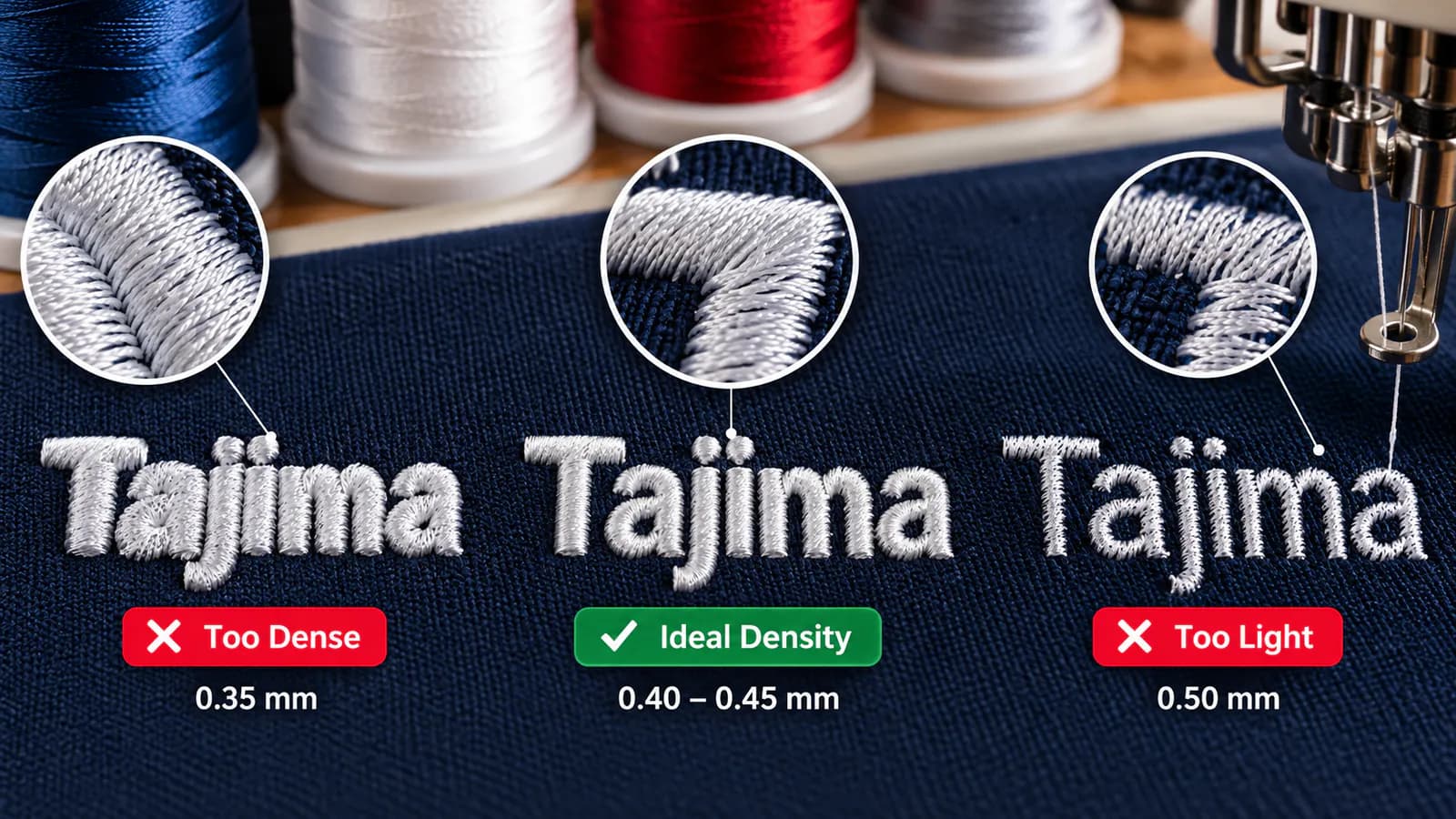
For many small satin letters stitched with standard 40-weight thread, 0.40–0.45 mm stitch spacing is a practical starting point. However, the ideal setting depends on thread weight, letter size, fabric, and stitch construction.
At Tajima Digitizer, we help embroidery businesses and uniform suppliers prepare clean, machine-ready files for small lettering and detailed logos.
Here's how to choose the right density and avoid common embroidery problems.
What Is Stitch Density in Embroidery?
Stitch density describes how closely stitches are placed in an embroidery design.
For satin stitch lettering, density is usually adjusted through the spacing between successive stitch passes.
A smaller spacing value creates tighter stitching. A larger value creates more open stitching.
For example:
0.35 mm: Higher stitch density.
0.40 mm: Common starting point for standard satin lettering.
0.45 mm: Slightly more open stitches.
0.50 mm: Lower density that may reduce buildup in narrow letters.
These measurements refer to satin stitch spacing. Other stitch types, such as fill and running stitches, use different construction settings.
The goal is to achieve good thread coverage without making the letters bulky.
Best Stitch Density Settings for Small Embroidery Lettering
Different lettering applications require different density settings.
The following ranges are useful starting points for testing:
Embroidery application | Suggested stitch spacing |
|---|---|
Standard small lettering with 40wt thread | 0.40–0.45 mm |
Very narrow satin letters with 40wt thread | 0.45–0.50 mm |
Fine lettering with 60wt thread | Approximately 0.35–0.40 mm |
Small text on stretchy fabric | Start with 0.40–0.45 mm and test |
Small lettering on textured fabric | Adjust for thread weight, underlay, and surface texture |
Important: These are starting ranges rather than guaranteed settings. The correct density must be confirmed with a test stitch-out.
Why Higher Density Is Not Always Better
Too many stitches in a small area can make embroidery worse.
For example, imagine stitching a company name that measures only 6 mm tall.
If the satin stitches are packed too closely, the open spaces inside letters such as a, e, and o may close.
The result looks heavy and difficult to read.
Sometimes, increasing stitch spacing from 0.40 mm to 0.45 mm can improve the finished lettering by reducing unnecessary thread buildup.
How Thread Weight Affects Stitch Density
Thread weight is one of the most important factors when digitizing small text.
40wt Thread for Standard Small Lettering
40-weight embroidery thread is commonly used for logos, uniforms, polo shirts, and personalized apparel.
It provides good coverage and works well for many lettering designs.
For standard small satin lettering, 0.40–0.45 mm spacing is a reasonable starting point.
However, narrow strokes may require lighter density to maintain readable letter shapes.
60wt Thread for Tiny Embroidery Text
60-weight thread is finer than 40-weight thread.
This makes it useful for detailed lettering, fine outlines, and small logo elements.
Because the thread is thinner, closer stitch spacing may be required to achieve adequate coverage.
A compatible smaller needle and suitable digitizing settings are also important.
For embroidery shops working with difficult text, our small lettering digitizing service focuses on narrow satin columns, light underlay, and improved letter spacing.
What Is the Minimum Size for Embroidery Lettering?
Letter height directly affects readability.
For standard 40wt embroidery thread, approximately 6 mm (0.25 inches) is a practical minimum starting point for many simple embroidery fonts.
With finer 60wt thread and suitable fonts, smaller lettering may be possible.
However, the smallest readable size depends on several factors:
Font style and individual stroke width.
Thread thickness.
Fabric stability.
Stitch density and underlay.
Needle size and machine setup.
Simple sans-serif fonts usually perform better at small sizes than decorative scripts.
Before reducing a logo, check whether the lettering will remain readable on the finished garment.
How Fabric Type Changes Small Lettering Density
The same embroidery file may produce different results on different fabrics.
Cotton and Woven Fabrics
Stable woven fabrics often provide a firm surface for small satin lettering.
Start with the appropriate density for your thread and adjust according to the actual stitch-out.
Polo Shirts and Stretch Fabrics
Stretchy garments may pull or distort during embroidery.
Excessive stitch density can increase puckering and make small letters appear uneven.
Correct stabilizer, hooping, and pull compensation are essential.
Fleece and Textured Fabrics
Textured fabric may cause small stitches to sink into the surface.
Suitable topping and underlay can help keep lettering visible.
Increasing density alone will not necessarily solve the problem.
Choosing the Right Stitch Types and Underlay
Satin stitches are commonly used for embroidery lettering because they create smooth, defined columns.
However, stitch type selection should match the design.
Satin stitches work well for standard lettering and narrow shapes.
Running stitches may be suitable for extremely fine lines or selected details.
Fill stitches are generally used for broader areas rather than tiny lettering.
Underlay also plays an important role.
For narrow satin lettering, a light center-run underlay may provide sufficient support. Excessive underlay can add bulk and reduce readability.
Learn more in our guide to types of underlay in embroidery.
How to Test Stitch Density for Small Embroidery Lettering
A physical stitch-out is the best way to evaluate your settings.
Here's a simple, user-friendly testing process.
Step 1: Prepare Three Density Versions
Create three versions of your lettering with the following spacing:
Version A: 0.40 mm
Version B: 0.45 mm
Version C: 0.50 mm
This comparison is suitable as an initial test for selected small lettering designs using 40wt thread.
Step 2: Use the Same Fabric and Thread
Keep the lettering size, stabilizer, thread, needle, and machine settings consistent.
Changing several variables simultaneously makes it harder to identify the cause of a problem.
Step 3: Compare the Results
Examine each sample for:
Clear letter shapes.
Open spaces inside characters.
Smooth satin stitching.
Adequate thread coverage.
Minimal fabric puckering.
Choose the setting that offers the best balance of clarity and coverage—not simply the highest stitch count.
Common Small Lettering Problems and Solutions
Problem | Likely cause | Recommended solution |
|---|---|---|
Letters look too thick | Excessive density | Increase stitch spacing slightly |
Small letters close up | Crowded strokes or font too small | Reduce buildup or enlarge text |
Fabric shows through | Insufficient coverage | Check density and underlay |
Letters look uneven | Fabric movement | Adjust stabilizer and compensation |
Frequent thread breaks | Needle, tension, or excessive penetrations | Check machine setup and density |
Text sinks into fleece | Fabric texture | Use suitable topping and support |
Remember that density is not responsible for every embroidery problem.
Sometimes the best solution is changing the font, increasing the text size, or correcting the production setup.
Preparing Vector Files and DST Embroidery Files
Good embroidery starts with suitable artwork.
Clean vector files, such as AI or EPS, can make it easier to identify letter shapes and fine details before digitizing.
If the original artwork is blurry or pixelated, Tajima Digitizer offers vector tracing services to prepare clearer artwork.
Once the design is ready, it must be digitized into stitch instructions.
Many embroidery businesses need to convert to DST for Tajima or compatible commercial embroidery machines.
However, converting an image to a DST embroidery file is not simply a matter of changing its extension.
The design needs suitable stitch types, density, sequencing, and machine instructions.
For more information, read our guide to DST, PES, EXP, and JEF embroidery file formats.
Why Choose Professional Small Lettering Digitizing?
Small lettering requires more precision than many standard embroidery designs.
A professional digitizer considers stitch density, font structure, letter spacing, underlay, and fabric requirements before preparing the finished file.
At Tajima Digitizer, our small lettering service is designed for:
Employee names on uniforms.
Small corporate logos.
Fine embroidery text on caps.
Taglines beneath company logos.
Detailed lettering on workwear.
Small lettering digitizing starts at $8 USD, with a typical standard turnaround of 4–12 hours, depending on the design.
We provide popular machine formats, including DST, PES, EXP, JEF, and others.
Eligible corrections to the original order are available when requested within 30 calendar days of final delivery.
Frequently Asked Questions
What is the best stitch density for 40wt embroidery thread?
For many small satin lettering designs, 0.40–0.45 mm spacing is a practical starting point.
The final setting depends on the satin-column width, fabric, and embroidery conditions.
Is 0.45 mm stitch density good for small lettering?
Yes. A spacing of 0.45 mm can be useful for small lettering using 40wt thread, especially when tighter spacing causes thread buildup.
Always test the finished design.
Can I embroider lettering smaller than 6 mm?
Yes, some designs can be embroidered below 6 mm using suitable fonts, finer thread, and specialized digitizing.
However, not every font or fabric supports very small text.
Which stitch type is best for embroidery lettering?
Satin stitch is commonly preferred for standard embroidered lettering.
Very fine details may require different stitch construction, depending on the design.
Does changing a file to DST improve embroidery quality?
No. DST is an embroidery machine file format.
The quality of the lettering depends primarily on the digitizing decisions, including density, stitch types, underlay, and design size.
Conclusion: Get Small Embroidery Lettering Right
The best stitch density for small embroidery lettering depends on finding the right balance between thread coverage and readability.
For many designs using 40wt thread, 0.40–0.45 mm spacing is a practical starting point.
But professional results also depend on font selection, thread weight, fabric, stitch construction, and testing.
At Tajima Digitizer, we prepare machine-ready embroidery files designed to help small text remain clean, sharp, and readable.
Whether you need company logos, employee names, or detailed lettering, our team can help prepare your artwork for embroidery production.
Explore Our Small Lettering Digitizing Service or upload your design for a quote.
Get your small lettering digitized for the details that matter.